
How to Change Healthcare Payer Enrollment Without Claims Disruption
TL;DR — Enrollment Changes Need Tracking Through Verification
Define the exact provider, group, location, billing, ownership, or participation change before contacting payers.
Review each payer’s forms, portal requirements, signatures, supporting documents, and submission channels.
Validate NPI, TIN, taxonomy, addresses, affiliations, licenses, and effective dates before submission.
Determine whether the change also affects payer credentialing.
Track reference numbers, payer responses, missing documents, follow-ups, and confirmed effective dates.
Complete enrollment verification before treating the update as active.
Monitor claims after confirmation for provider mismatches, rejections, denials, and payment-routing issues.
AM InfoWeb supports provider organizations through documentation, payer follow-up, QA, verification tracking, and claims-impact visibility.
A request to change healthcare payer enrollment may look like a straightforward administrative update, but inaccurate or incomplete information can affect claims, reimbursements, provider directories, and payer communication. A new location, billing address, tax ID, provider affiliation, ownership structure, or participation status may require updates across several payer systems and workflows.
Submitting a form is only one part of the process. Provider organizations also need payer-specific documentation, clean provider data, credentialing awareness, active follow-up, and confirmation that the requested change is fully active. Without those controls, teams may assume an update is complete while claims continue to reject or payments route using outdated information.
What Does It Mean to Change Healthcare Payer Enrollment?
To change healthcare payer enrollment means updating the provider, group, location, billing, ownership, credentialing, or participation information held by one or more payers.
The process may require payer-specific forms, portal updates, supporting documentation, signatures, validation, and follow-up. A change is not necessarily active when the request is submitted. It may first move through enrollment review, data validation, credentialing, contracting, or payer-side system updates.
For Medicare, CMS allows providers and suppliers to review and update enrollment information and report changes through PECOS, its online enrollment management system. CMS also specifies reporting timeframes for certain Medicare enrollment changes, showing why provider organizations must understand the requirements tied to the specific payer and update.
When Providers Need to Update Payer Enrollment
Enrollment updates are commonly triggered when a provider joins or leaves a group, opens a new practice location, changes a billing or pay-to address, updates a tax ID, changes ownership, or modifies a group affiliation.
Other triggers may include NPI or taxonomy changes, licensing updates, banking or EFT changes, payer-contract changes, and corrections to inaccurate provider records.
The operational impact depends on the type of change. A demographic update may affect provider-directory accuracy, while a TIN, affiliation, or ownership change may influence billing, contracting, credentialing, or claims processing. Teams should therefore identify the downstream workflows that could be affected before submitting anything.
How to Update Healthcare Payer Enrollment
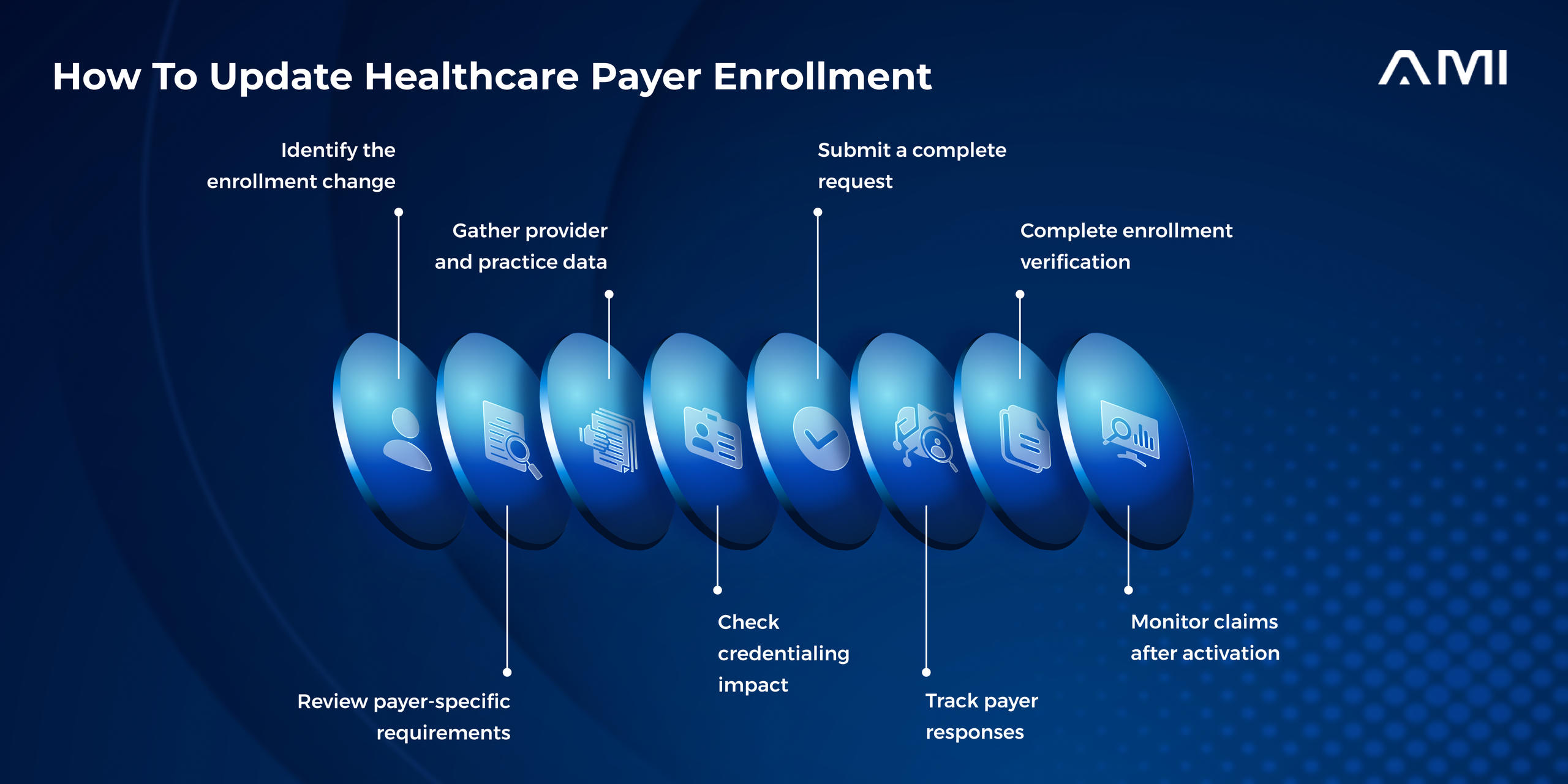
Although payer requirements differ, a controlled update generally follows the same operating sequence. Each stage should create enough documentation for the next person handling the request to understand what changed, what was submitted, and what remains unresolved.
Step 1: Identify the enrollment change
Start by defining the exact change rather than submitting a broad request to “update the provider.”
Document the affected provider or group, payer, location, NPI, TIN, effective date, and change category. Useful categories include demographic update, provider addition, provider termination, billing update, ownership change, credentialing update, contract change, or EFT update.
Clear classification helps the team determine which payer department, form, portal, and supporting documents are likely to apply.
Step 2: Review payer-specific requirements
The complexity of payer enroll services comes from variation between payers.
One payer may accept an update through an online portal. Another may require a signed form, provider-data platform update, supporting tax document, or separate credentialing review. Medicare enrollment updates can be submitted through PECOS, while commercial plans may use their own portals, provider-maintenance forms, or authorized provider-data platforms.
Teams should confirm the current submission channel and requirements before preparing the packet. Reusing the wrong form or assuming that one payer follows another payer’s process can create avoidable delays.
Step 3: Gather accurate provider and practice data
Clean information is the foundation of a successful enrollment update.
A practical review should confirm:
- Provider name, individual NPI, group NPI, TIN, and taxonomy code
- License information and current credentialing profile where applicable
- Practice, billing, pay-to, and mailing addresses
- Group affiliation and legal-entity information
- Effective date of the requested change
- Payer-specific forms and supporting documents
- Contact person responsible for payer follow-up
- Banking or EFT information when relevant
Providers using DataSpring, formerly CAQH, can maintain profile information and share authorized data with participating health plans. That may support credentialing and data-maintenance workflows, but the payer may still require additional enrollment steps or confirmation.
Step 4: Check the Payer Credentialing Impact
Payer credentialing and enrollment are related, but they are not always the same process.
Credentialing generally evaluates a provider’s qualifications, licensing, education, training, and professional background. Enrollment registers or updates the provider within the payer’s systems so the provider can participate, bill, or be recognized correctly.
Adding a provider, changing group affiliation, opening a new location, or modifying participation details may trigger credentialing or recredentialing activity. Provider organizations should determine whether the requested change can proceed as a maintenance update or whether additional qualification review is required.
Step 5: Submit a complete request
Submit the request through the payer’s approved channel with accurate data, required signatures, and all supporting documentation attached.
The team should retain a copy of the complete packet, confirmation of submission, and any payer-generated reference or ticket number. For online systems, save the status page or confirmation notice rather than relying on an employee’s memory that the submission was completed.
Where paper or emailed documentation is required, confirm the destination and department before sending the request.
Step 6: Track payer responses and follow-ups
Enrollment requests should not disappear into inboxes, individual spreadsheets, or portal notes.
A centralized tracker should show the payer, affected provider or group, change type, submission date, submission method, reference number, current status, missing-information requests, follow-up history, expected effective date, and final confirmation.
Follow-up should reflect the reason the case remains open. A request awaiting payer review requires a different next action from one held for a missing document, credentialing requirement, portal defect, duplicate provider record, or unclear effective date.
Step 7: Complete Enrollment Verification
Enrollment verification confirms that the payer has processed the change correctly.
Verification may involve reviewing portal status, obtaining written payer confirmation, checking the provider directory, validating EFT details, confirming network or affiliation records, or performing another payer-approved check.
CMS describes PECOS as a system providers can use to review and update enrollment information, but provider organizations still need to verify that submitted changes have moved through processing and are reflected correctly.
A submitted or accepted request should not automatically be treated as an effective update.

Why do payer operations slow down even with more resources?
Because claims, provider inquiries, member support, and policy workflows need more than added capacity. AM InfoWeb helps payers improve accuracy, turnaround time, and operational visibility with co-managed support teams and workflow-focused execution.
Step 8: Monitor claims after activation
Even after payer confirmation, claims should be monitored for enrollment-related problems.
Look for rejections, denials, provider mismatch messages, billing-address errors, incorrect group affiliations, payment-routing problems, or claims processed under outdated information.
Claims monitoring provides a practical confirmation that the payer-side enrollment record is functioning as expected. When errors continue, the enrollment case should remain connected to the claim issue rather than being treated as a separate closed task.
Provider Enrollment vs. Payer Credentialing
Provider enrollment is the process of registering or updating a provider with a payer so that the provider can participate, submit claims, receive payment, or be recognized within the payer’s systems.
Payer credentialing evaluates whether the provider meets qualification and participation requirements. This may involve education, training, licensing, professional history, and other supporting information.
The workflows frequently overlap, but one does not automatically complete the other. A provider may be credentialed but still require an enrollment or system-maintenance update before claims process correctly. Similarly, an enrollment change may trigger a new credentialing review depending on the payer and change type.
Why Payer Enrollment Updates Get Delayed
Common delay drivers include missing documents, incorrect NPI or TIN information, incomplete signatures, outdated provider profiles, wrong payer forms, unclear effective dates, portal errors, and duplicate records.
Requests also stall when no one owns the follow-up. A payer may ask for clarification or an additional document, but the message remains in an individual inbox while the operational tracker continues to show the case as submitted.
Payer backlogs are sometimes unavoidable, but internal preparation and tracking still matter. Reviewing the request against payer requirements before submission and again after every payer response can reduce unnecessary correction cycles.
How Payer Enroll Services Support Provider Operations
Structured payer enroll services help provider organizations manage forms, supporting documents, portals, payer follow-up, credentialing coordination, verification, and issue resolution.
The value lies in maintaining one controlled view of the update. Internal leaders should be able to see which changes are open, where they are delayed, which payer has requested more information, and whether claims are being affected.
Effective support adds operational capacity without removing client oversight. Policies, contracting decisions, provider approvals, and payer-specific exceptions should remain visible to the provider organization.
Where AI Can Support Enrollment Workflows
AI-assisted tools can help categorize enrollment requests, identify potentially missing fields, summarize payer responses, flag aging updates, and surface repeated documentation issues.
They can also support dashboard visibility across high request volumes by showing which payers, change types, or missing-document reasons create the most delays.
AI should not independently determine credentialing status, approve provider participation, or assume an enrollment change is active. Human review and payer-side validation remain necessary for documentation exceptions, qualification questions, contract implications, and final confirmation.
How AM InfoWeb Supports Healthcare Payer Enrollment
AM InfoWeb supports provider organizations with enrollment and healthcare payer services designed to improve request accuracy, follow-up discipline, and operational visibility.
With trained healthcare operations teams, provider-update support, credentialing coordination, verification tracking, QA, documentation, and claims-impact monitoring, AM InfoWeb helps leaders manage payer changes without losing control over status or communication.
AM InfoWeb support may include:
- Payer enroll services and provider-update support
- Healthcare payer services across provider workflows
- Provider enrollment documentation and tracking
- Payer credentialing coordination
- Enrollment verification follow-up
- Provider-data management
- Payer status and missing-information follow-up
- Claims-impact monitoring
- QA, escalation, and case-note discipline
- Backlog and leadership reporting
- Co-managed operations with client oversight
Need better control over payer enrollment changes and claims impact? AM InfoWeb’s co-managed payer operations connect documentation, follow-up, verification, QA, and reporting across the full workflow.
Get in TouchFinal Thoughts
A successful payer enrollment update requires more than submitting a maintenance form. Provider organizations need accurate data, payer-specific documentation, credentialing awareness, active follow-up, verification, and post-change claims monitoring. The safest way to change healthcare payer enrollment is to manage the request through confirmed activation rather than assuming submission equals completion.
Frequently Asked Questions
About the Author

Written by
Urza Dey
Urza Dey is a content and copywriter with over five years of experience across marketing, B2B SaaS, HealthTech, EdTech, and related industries. At AMI, they contribute to content strategy, blog development, and marketing communication focused on healthcare operations, business process management, and AI-enabled service delivery.